Engaging Remote Attendees in Hybrid Events: 2026 Guide
What if remote attendees had as much influence on a hybrid event as the people in the room? Engaging remote attendees in a hybrid event takes more than switching on a camera and hoping someone finds the chat. It starts with designing participation into the programme, so online guests know how to contribute, when their input will be heard and how it connects to the conversation.
That can be easier said than done. In-room discussions move quickly, online questions can be overlooked, and speakers, moderators and production teams need to work in step. A livestream may show what’s happening, but it won’t automatically make remote participants feel included. No one should need the reflexes of a quiz-show contestant to get a word in.
This guide covers how to plan interaction, structure sessions and coordinate facilitation and technology for a coherent experience across both audiences. You’ll find practical ways to give remote attendees a meaningful role before, during and after the event. Dominic Marc Short - Independent Consultant founder Dominic Marc Short brings experience in event organisation and moderation, with more than 500 events delivered worldwide.
Key Takeaways
Make engaging remote attendees in a hybrid event measurable by defining the actions that show participation, from asking questions to connecting with other attendees.
Build the programme around clear outcomes, then choose interactions that suit each session rather than adding polls or chat prompts for their own sake.
Compare engagement tools by purpose, ease of use, moderation needs and how participants’ contributions reach the speakers.
Give moderators and production teams distinct responsibilities, with prepared language for bringing online questions and perspectives into the room.
Set a small number of engagement objectives and use participation evidence to shape improvements for your next event.
Table of Contents
Why engaging remote attendees in a hybrid event starts before the broadcast
How to design a hybrid event programme that gives remote attendees a role
Hybrid engagement tools compared: choose technology around participation
How moderators and event teams keep remote attendees involved live
Measure remote attendee engagement and improve the next hybrid event
Why engaging remote attendees in a hybrid event starts before the broadcast
A broadcast gives remote attendees access to the event; a participation plan gives them a reason and a way to take part. A hybrid event brings in-person and online audiences together, but combining the two formats doesn’t guarantee that they’ll share the experience. If the agenda is built around the room, online attendees may be left watching conversations they can’t easily enter.
Engagement is visible in what people do. They ask questions, contribute ideas, respond to a prompt or connect with other attendees. Those actions need a place in the programme, along with clear instructions on how and when to take part. Hybrid engagement is planned participation that gives in-person and remote audiences clear, considered ways to contribute and connect.
This is why engaging remote attendees in a hybrid event starts before anyone goes live. Consider a panel where the audience is invited to raise questions from the floor. Without a moderator collecting online contributions and bringing them into the discussion, remote attendees may not know whether to post, speak or wait. The issue isn’t that people lack interest; the programme hasn’t made participation clear.
What remote attendees need from the event experience
Remote participation begins with practical clarity: joining instructions that are easy to follow, a visible programme and accessible ways to contribute. Attendees also need to understand how their input relates to the session and know that someone will notice it. A relevant prompt gives people a reason to join in; acknowledgement shows them their contribution mattered.
Live participants and people accessing content later have different opportunities. A recording can offer useful material, but it can’t recreate a live question-and-answer exchange or real-time connection. Plan live interaction during the event, and treat later access to content as a distinct part of the experience.
Where hybrid participation commonly breaks down
Review the programme for moments when participation could become difficult. In-room conversations can move quickly, turn-taking may be unclear, and online questions can be missed if no one is responsible for monitoring them. Long stretches of presentation without a pause or invitation to respond also leave few natural openings for attendees to contribute.
These are design risks, not inevitable failures. Before the event, review each session and ask: when can remote attendees participate, how will their contributions reach the speaker, and who will acknowledge them? Clear answers help prevent online participation from becoming a chat window that everyone forgets to open.
How to design a hybrid event programme that gives remote attendees a role
To prevent remote participants from becoming passive viewers, plan their opportunities to contribute alongside the in-room agenda. A practical design process connects the event’s aims to specific audience moments, interaction formats and people responsible for making participation work. It helps the programme feel like one shared experience, rather than a room-based event with an online window attached.
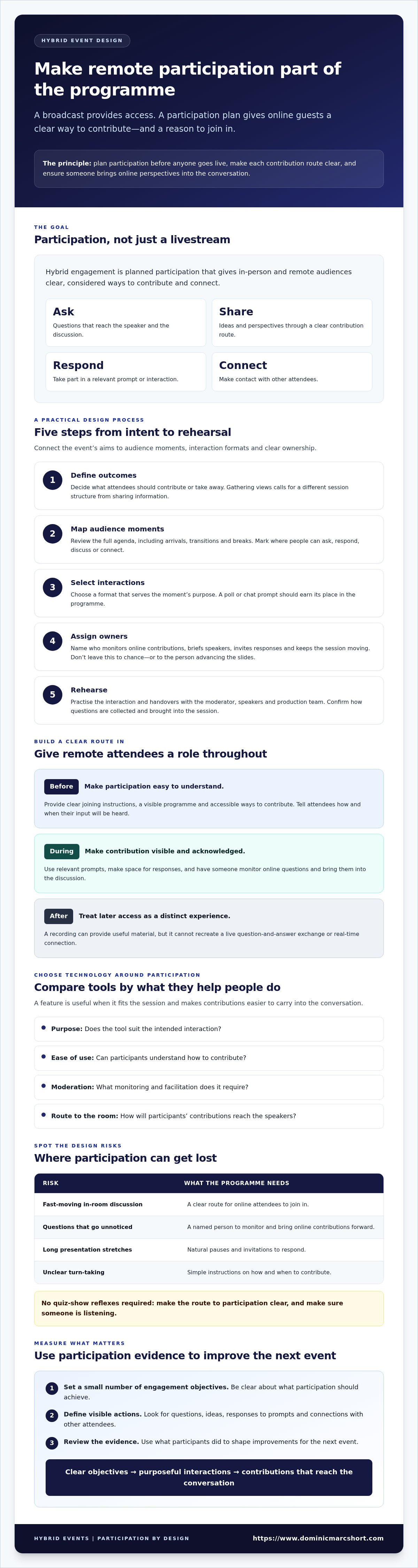
Every planned interaction needs a clear participation route and an owner who ensures contributions reach the conversation. Use this five-step process:
1. Define outcomes. Decide what attendees should contribute or take away. A session designed to gather views needs a different structure from one focused on sharing information.
2. Map audience moments. Review the full agenda, including arrivals, transitions and breaks. Identify where remote and in-person attendees can ask, respond, discuss or connect.
3. Select interactions. Choose a format that serves each moment’s purpose. Avoid adding a poll or chat prompt simply because the feature is available.
4. Assign owners. Name who will monitor online contributions, brief speakers, invite responses and keep the session moving. Don’t leave these responsibilities to chance or to the person also advancing the slides.
5. Rehearse. Practise the interaction and handovers with the moderator, speakers and production team. Check that everyone knows how questions are collected and brought into the session.
Choose interaction formats that suit the session
Match the tool to the task. Moderated Q&A gives attendees a route to submit questions and lets a moderator group or prioritise them. Polls can gather quick input, while small-group discussion suits shared problem-solving when participants have a clear prompt and a way to report back.
Chat can support a session when attendees are invited to share brief reflections or respond to a specific question. It can distract when several discussions run at once or no one relays useful contributions to the speaker. For every activity, provide an equivalent way for people in the room and online to take part, even if the mechanics differ.
Make the agenda legible to both audiences
Show in the programme when remote attendees can ask questions, join a discussion and expect a response. Build in pauses for the moderator to bring online contributions into the room. Spontaneous interruptions are not a dependable participation plan. Make transitions and breaks clear too, so attendees know whether discussion is continuing or the session has paused.
For a broader view of how programme design fits into event planning, explore this strategic corporate event management guide. If you’re shaping a programme that needs confident facilitation, you can also learn about event moderation and keynote speaking.
Hybrid engagement tools compared: choose technology around participation
Technology can make it easier for remote attendees to contribute, but no tool can decide when their input matters or ensure a speaker responds. To engage remote attendees in a hybrid event, choose tools around the session’s purpose. Then plan who will monitor contributions, share them with speakers and close the loop with attendees.
When chat, Q&A, polls or collaboration tools make sense
Use each format with intent. Chat suits brief reactions or a focused prompt when someone can monitor responses and surface useful points. Moderated Q&A works when questions need sorting, sequencing or a direct answer from a speaker. Polls can gather quick input, while shared collaboration spaces can help groups develop ideas together. In both cases, make clear how the results will shape the discussion or next steps.
If a tool generates contributions that nobody reviews, it adds activity without meaningful participation. That’s a lot of clicking for very little conversation.
How to select tools without adding unnecessary complexity
Test the attendee journey from joining the session to submitting input and receiving a response. Check whether participants can use the chosen tools without switching between too many interfaces. Each extra step is another chance for someone to lose the thread or the link.
Before selecting a platform, confirm its current features and accessibility options with the provider. Capabilities can vary by product, plan and configuration, so check that a tool supports the function you need. Rehearse the planned route with the moderator, speakers and production team, including what happens if a contribution doesn’t reach the speaker as expected. Technology should support the agenda and facilitation, not become the agenda.
How moderators and event teams keep remote attendees involved live
Live inclusion depends on people as much as technology. A clear division of responsibilities helps the moderator focus on the conversation while the event team keeps questions, speakers and production moving in step. If everyone assumes someone else is watching the online audience, a thoughtful question can disappear into the digital shrubbery.
Before the session, agree who leads each task:
Moderator: Guides the discussion, manages turns and brings contributions from both audiences into the conversation.
Audience monitor: Watches the agreed online channel, identifies relevant questions and passes them to the moderator or speaker liaison.
Speaker liaison: Briefs speakers, flags selected questions and helps them prepare for audience handovers.
Production lead: Coordinates the technical setup and receives reports of urgent issues through an agreed route.
Adapt these roles to the event team, but give each responsibility a named owner. That clarity lets the moderator facilitate instead of trying to read chat, introduce speakers and remember the next slide at the same time.
Prepare moderators, speakers and technical teams
Brief speakers on where audience questions will appear, how the moderator will signal a turn and who selects contributions. Agree how the audience monitor will alert the production lead to a technical problem without disrupting the session unnecessarily. Then rehearse transitions and participation tools using the intended event setup. A short run-through can reveal a confusing handover before attendees are watching it happen.
Facilitate equitable participation during the session
Bring remote and in-room voices into the programme throughout, rather than saving online contributions for the final minutes. A moderator might say, “We’ve heard a useful point from the room. Let’s bring in a question from our remote audience,” or “There’s a question online that builds on that idea.” Read the question aloud so everyone can follow. Name the contributor only when appropriate and with their consent.
Make handovers explicit: tell attendees whose turn it is, where to direct a contribution and when the discussion will move on. If a technical interruption occurs, acknowledge it calmly, explain the immediate next step and allow the production lead to resolve the issue. Avoid promising how quickly it will be fixed.
Not every question will fit the live discussion. Tell attendees how unanswered contributions will be handled, then assign a specific team member to coordinate follow-up. This closes the loop and shows that a question hasn’t simply been left behind when the session ends.
For event moderation and delivery support, view Dominic Short’s event services.
Measure remote attendee engagement and improve the next hybrid event
When engaging remote attendees in a hybrid event, start measurement with a clear question: what should participants be able to do, and how will you know whether the opportunity worked? Set a small number of objectives before choosing indicators. For example, you might aim to give remote participants a chance to question a speaker, contribute to a group discussion or share feedback that informs a next step.
Then compare the opportunities you planned with what actually happened. Review questions submitted, poll responses, session feedback and follow-up actions, but interpret each in context. A high volume of chat messages shows activity, not necessarily that attendees found the discussion relevant. Attendance and interaction counts help describe participation; feedback helps explain whether it was useful.
Evaluate participation without relying on one metric
Look at the full participation journey. Were planned interactions delivered? Could attendees complete them? Did their contributions reach the speaker or influence the discussion? Where appropriate, review feedback from remote and in-person participants separately. Their experiences may differ, and combining them too early can obscure where the programme worked well or needs attention.
Use several types of evidence rather than treating one number as a verdict. A question submitted, a response to a poll and a comment that an activity felt relevant each tell you something different. Together, they provide a more useful picture than a busy chat box alone.
Turn event feedback into practical improvements
After the event, identify the moments when remote attendees contributed easily and those where participation stalled. Compare attendee feedback with the event team’s notes. Perhaps questions arrived but weren’t brought into the room, or an activity needed clearer instructions. Separate observations from assumptions, then select a manageable set of changes for the next programme.
Agenda: Adjust where participation opportunities appear.
Facilitation: Clarify who invites contributions and acknowledges them.
Communications: Make joining and participation instructions easier to follow.
Technology: Review whether the chosen tools supported the intended interaction.
Assign an owner to each action and record what should change before the next event. This turns feedback into a working plan, rather than a document everyone admires once and then politely forgets. For a related event-planning perspective, see this strategic corporate event management guide.
Intentional design, experienced moderation and coordinated event delivery can help bring these improvements together. CDABS organises meetings, events and conferences, and provides moderation and keynote speaking. Founder Dominic Short has delivered over 500 events worldwide.
Make your next hybrid event a shared experience
Engaging remote attendees in a hybrid event starts with intentional design, not simply adding a broadcast. Give online participants clear opportunities to contribute, choose tools that serve each session and make sure moderators and event teams know how to bring those contributions into the room.
Afterwards, review both participation and feedback. Activity counts can show what happened; attendee responses help you understand whether it felt relevant and worthwhile. Use those insights to refine the agenda, facilitation and communications for your next event.
Dominic Short brings more than 30 years of experience across business travel management, meetings and events, and marketing. He has delivered over 500 events in varied formats and contexts worldwide, experience that informs a considered approach to event organisation and moderation.
With a clear plan and the right people guiding the conversation, remote attendees can play a meaningful part from the first session to the last. That’s a strong place to begin.
Frequently Asked Questions
How do you keep remote attendees engaged during a hybrid event?
Give remote attendees planned opportunities to participate throughout the programme, not just a livestream to watch. Explain how to ask questions, contribute to discussions and receive responses, then assign someone to monitor online input and bring it into the room. Use pauses for questions and responses, and brief speakers and moderators on the process. After the event, review feedback to see whether those opportunities felt useful and relevant.
What are the best activities for engaging remote attendees in a hybrid event?
The best activities depend on what each session needs to achieve. Use moderated Q&A when attendees need answers from a speaker, a poll to gather quick input that will inform the discussion, or a structured small-group conversation for shared problem-solving. Chat can work for brief reactions or a focused prompt, provided someone can surface useful contributions. Make the purpose and participation route clear before each activity begins.
How can a moderator include online participants in an in-person event?
A moderator can include online participants by alternating between questions and comments from the room and contributions submitted remotely. Read online questions aloud, acknowledge the contributor when appropriate and with their consent, and give the speaker time to respond. Agree beforehand who is monitoring online channels and how contributions reach the moderator. If a question can’t be covered live, explain how it will be handled and assign someone to follow up.
Which technology helps engage remote attendees at a hybrid event?
Useful options may include chat for brief contributions, moderated Q&A for questions, polls for quick input and shared collaboration tools for group tasks. Choose based on the session’s purpose, how easily attendees can use the tool and how responses will reach speakers. Check the platform’s current capabilities and accessibility options before making a selection. A tool supports participation, but it can’t replace a clear agenda or attentive facilitation.
How do you make a hybrid event fair for remote and in-person attendees?
Fairness means giving both audiences meaningful ways to contribute and making the process clear, not necessarily making every interaction identical. Tell remote attendees when they can ask questions or join a discussion, and build time into the agenda for their contributions. Make sure in-room attendees also have a clear route to participate. During sessions, moderators should bring perspectives from both audiences into the conversation rather than leaving online input until the end.
How can you measure remote attendee engagement at a hybrid event?
Start with a few objectives, such as enabling remote attendees to ask questions or contribute ideas. Review evidence that relates to those aims, including questions submitted, poll responses, session feedback and follow-up actions. Compare planned interactions with those delivered and completed. Activity counts can indicate participation, but they don’t prove that attendees found it valuable. Feedback helps explain whether the experience felt relevant, clear and worth taking part in.
What should the event team do if remote attendees stop participating?
First, check whether attendees have a clear, accessible way to contribute and whether anyone is acknowledging their input. The team can invite a low-pressure response, such as a brief question or reaction, and allow time for people to take part. Check for technical or instruction issues through the agreed production channel. Afterwards, review feedback and session notes to identify where participation dropped, then assign owners to any changes needed.



Comments