Selecting a Corporate Booking Tool: A 2026 Buyer’s Guide
The tool with the longest feature list may be the one your employees quietly work around. Selecting a corporate booking tool is less about collecting impressive functions and more about finding a practical fit for your travel programme, people and business priorities.
A useful tool should balance employee choice with clear policy controls. Yet inventory, reporting, integrations and support vary, and an awkward booking journey can send travellers back to old habits. A feature checklist alone won’t show whether a platform will work in practice.
This guide offers a structured way to compare options against your organisation’s requirements, identify questions for shortlisted vendors and assess implementation effort. You’ll also learn how to define measurable success criteria, so your decision reflects business needs rather than polished demonstrations. The goal is a booking experience employees can use, with the oversight your organisation needs and a clear path from evaluation to adoption.
Table of Contents
What Does a Corporate Booking Tool Do for a Travel Programme?
When work travel is booked through a mix of supplier websites, email requests and spreadsheets, it can be difficult to see what has been arranged and whether each booking follows company policy. A bigger system is not always the answer. Start by defining the booking tool’s role within the wider travel programme.
A corporate booking tool is a business-focused system that enables employees to search for and reserve work travel, while giving an organisation defined ways to manage bookings and access itinerary information. It may be a standalone tool or part of a broader travel management platform or service. A Travel Management Company (TMC) may provide booking technology as part of wider travel management services, but the tool and the support around it are not the same thing.
Direct supplier booking: Employees book with airlines, hotels or other suppliers individually. This can work for simple arrangements, but booking information may be spread across separate accounts and systems.
Corporate booking tool: Employees use a business-focused interface to search and reserve travel. Depending on the provider and set-up, it may also apply policy rules, route requests for approval and bring itinerary details together.
Travel management support: People provide guidance or assistance within an agreed travel management arrangement. The scope varies, so clarify what support is included rather than assuming it comes with the software.
Which tasks belong to the booking tool?
Common booking tasks include searching available options, making reservations, triggering approval workflows and giving travellers or authorised colleagues access to itinerary information. Functions, inventory and workflows vary by provider, so check them against your requirements. Don’t assume a booking interface also includes expense processing, payment arrangements or traveller support. Those may be separate capabilities, services or integrations.
Why does the choice affect more than booking?
A booking process affects how clearly employees can identify policy-compliant options, how straightforward the experience feels and what travel data the organisation can review. When bookings happen in disconnected channels, teams may have to collect details manually or reconcile information from several sources. Check whether that is happening in your organisation before deciding what the tool needs to solve.
As you begin selecting a corporate booking tool, consider how its remit fits the rest of your programme, not just how quickly someone can complete a reservation. For broader context, see this guide to global travel management solutions in Switzerland. Separating technology, service and internal process makes the evaluation more useful and helps keep itinerary details out of an inbox maze.
Which Corporate Booking Tool Criteria Should You Evaluate First?
Start with your travel programme, not a supplier’s demonstration. Before selecting a corporate booking tool, separate must-have requirements from preferences. A must-have supports an essential workflow or business priority. A preference is useful, but its absence wouldn’t rule out an otherwise suitable option. This distinction stops an attractive feature list from taking over the decision.
Next, weigh each criterion against actual travel patterns. An organisation with frequent itinerary changes may prioritise a straightforward booking and approval journey. A team that regularly reviews travel activity may put more weight on accessible reporting. The right balance depends on your programme, not a universal scorecard.
How should policy controls and traveller experience be balanced?
Policy is most useful when employees can understand it while searching and booking, rather than discovering a restriction after choosing an option. Ask vendors to demonstrate how exceptions appear and what travellers and approvers must do at each step. Assess usability against defined tasks, such as finding an option, completing a booking and submitting an exception. That makes “easy to use” something you can observe, not just a claim.
What reporting and integration questions belong on the shortlist?
Ask what data is available, who can access it and whether it can be exported in a format your team can use. Have vendors demonstrate connections with your existing systems, and confirm current integration details directly rather than relying on a general claim. For a wider technology evaluation, see the travel management software selection guide.
Record each requirement as essential, important or optional, then compare vendors against the same criteria. An independent business travel management consultant can help translate programme priorities into a practical, vendor-neutral evaluation.
Corporate Booking Tool or Human Travel Support: Which Model Fits?
A booking tool doesn’t automatically replace human travel support. It provides a way to search and book; the people, processes and assistance around it depend on the operating model. The practical question is not simply whether to automate, but which tasks travellers can manage themselves and where they may need guidance.
Consider three broad approaches:
Self-service booking: Employees use a corporate tool to search and arrange travel, usually within the organisation’s booking and approval processes. The organisation still needs to decide who handles questions, exceptions and internal administration.
Direct supplier booking: Travellers book with airlines, hotels or other suppliers individually. This may work for straightforward arrangements, but the organisation should consider how it will maintain visibility and manage booking information across separate channels.
Supported travel management: Booking technology sits alongside an agreed human support model. The provider’s responsibilities, contact routes and escalation process need to be defined.
None is automatically best for every organisation. Trip complexity, traveller needs and internal team capacity all matter. A tool that looks efficient on screen may shift work to employees or administrators if the surrounding processes aren’t considered.
When can self-service booking be a good fit?
Self-service may suit repeatable trips, clear policies and employees who are comfortable arranging standard reservations. Before choosing it, check that your organisation can manage approvals, exceptions and routine questions. Walk through a typical booking: who helps if a request needs approval, or if the traveller can’t find an option that fits policy? If the answer is unclear, address the process before launch.
When should human support remain part of the model?
Human assistance may be valuable for complex itineraries, frequent exceptions or journeys that need coordination. Ask each vendor to explain exactly what support is included, which channels travellers can use, when those channels are available and how issues are escalated. Confirm the terms directly. Don’t infer service scope from a product demonstration or a reassuring phrase on a web page.
Compare the complete operating model, not just the booking interface. Consider who owns policy decisions, handles approvals, responds to questions and reviews travel information. This helps reveal where a tool could reduce manual effort and where people remain essential. For help matching the options to your programme, consider independent business travel management consulting.
As you continue selecting a corporate booking tool, test the model against both an ordinary trip and a less straightforward one. The right balance should work for travellers and the teams responsible for the programme, without leaving anyone unsure who owns the next step.
How to Shortlist, Test and Compare Corporate Booking Tools
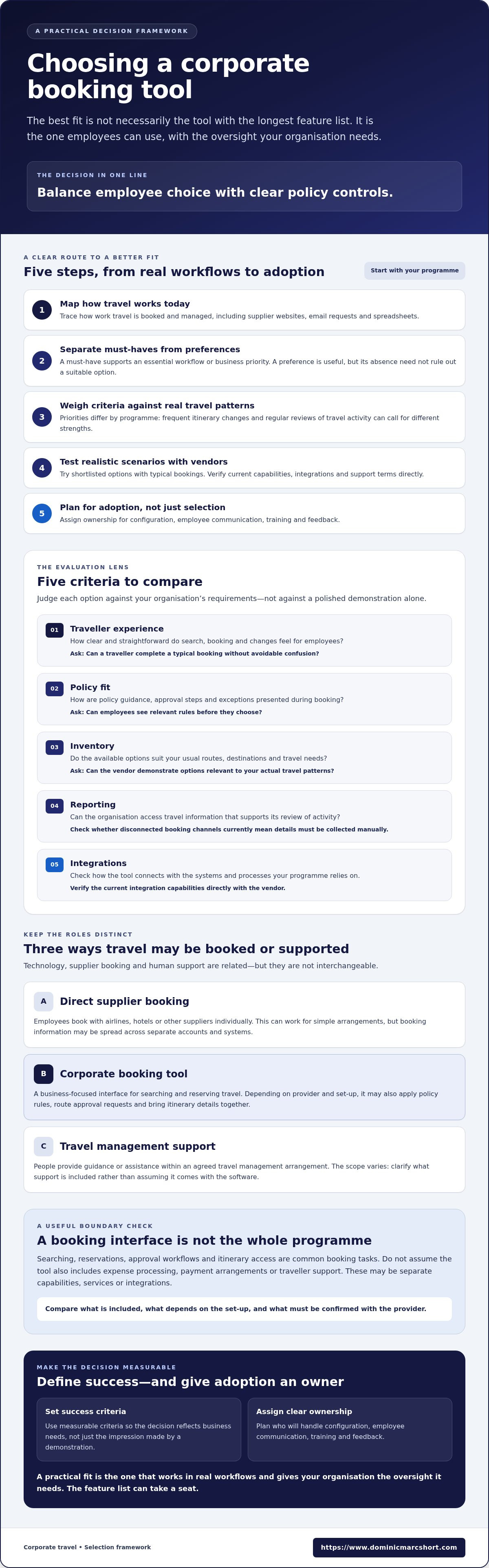
A consistent evaluation turns vendor demonstrations into useful evidence. Before selecting a corporate booking tool, agree how your team will compare options, what needs testing and who will assess the results. This helps distinguish a polished presentation from a tool that fits everyday work.
1. Map your needs. Document how employees book now, which travel patterns the programme needs to support and where the current process creates extra work. Include travellers, approvers and programme owners.
2. Set criteria. Separate essential requirements from preferences, then weight them according to business priorities. Decide what evidence will satisfy each requirement.
3. Create a shortlist. Compare potential providers against the same criteria. Ask them to clarify gaps, assumptions or claims that need verification before a demonstration.
4. Test realistic scenarios. Use examples based on your travel patterns and policy, such as a routine booking, a request that needs approval and a booking that requires an exception.
5. Decide using evidence. Record scores, supporting evidence, unanswered questions and trade-offs for every shortlisted provider. Decide how unresolved issues affect the choice before agreeing next steps.
For guidance on planning the work beyond selection, see this business travel technology implementation framework. Good preparation keeps the evaluation focused and avoids demonstrations that don’t address your requirements.
What should a tool demonstration prove?
Ask vendors to demonstrate search, approval steps, policy exceptions and access to itinerary information using your agreed scenarios. Invite employees, approvers and programme owners to assess the parts of the process they will actually use. Request demonstrations of relevant reporting and integrations, and verify current capabilities directly with the provider. Slides can introduce an idea, but they can’t show how a workflow feels in practice.
How can a pilot support a sound decision?
Agree success measures before a pilot begins. These might assess whether representative users can complete key tasks, whether policy rules are applied as intended and whether programme owners can access the information they need. Collect feedback in a consistent format, then compare findings with your weighted criteria rather than relying on the most enthusiastic or exasperated voice in the room. For programme-level context, consult the strategic business travel consulting guide.
Close the evaluation with a written decision record: what the chosen option meets, what remains uncertain and what needs resolving during implementation. A vendor-neutral review can help turn requirements into a clear comparison and decision process.
From Booking Tool Selection to Adoption and Better Travel Management
Choosing a tool is a decision, not a finish line. Next, make sure its settings, processes and employee guidance work together. Even a well-matched platform can feel like an obstacle course if policy rules are unclear or travellers don’t know where to get help.
Before launch, assign clear ownership for the practical details:
Programme owners oversee policy configuration, objectives and review of programme information.
Approvers understand their responsibilities and how to handle requests outside standard policy.
Employees receive clear guidance on how to search, book and raise questions or exceptions.
Technology stakeholders coordinate relevant system connections and help resolve technical issues within their remit.
Keep guidance concise and based on real booking workflows. Explain what employees should do, what happens next and who owns each step. A short, clear explanation is more useful than a grand manual that needs its own booking process.
What should the implementation plan include?
Plan policy configuration, communication and training alongside the technical set-up. Use examples that reflect how employees actually book, including how approval requests and exceptions are handled. Create a feedback loop so travellers, approvers and programme owners can report friction after launch. Review feedback regularly, clarify responsibilities where needed and make changes through an agreed process.
Measure adoption against objectives agreed before implementation. Depending on your priorities, review tool usage, the frequency and handling of exceptions, and whether reporting gives programme owners the information they need. Treat the findings as signals for improvement, not as a scorecard for blaming employees. If booking activity happens outside the tool, investigate why before concluding that the tool or traveller is at fault.
When can an independent advisor help?
An independent advisor can help analyse existing processes, define requirements and plan how people and technology will work together during implementation. This can be useful when an organisation needs a vendor-neutral view of its options and a considered approach to change. CDABS advises on business travel management and digital transformation; it doesn’t sell booking software. Its role is to support the organisation’s evaluation and planning, not promote a particular tool.
For a considered transition, connect the selection decision to the wider travel programme, employee communication and ongoing review. Discuss your travel programme with an independent business travel management consultant.
Choose a Tool That Works Beyond the Demo
The strongest choice is not necessarily the platform with the longest feature list. It’s the one that fits your travel patterns, balances employee experience with organisational oversight and connects sensibly with your existing processes. When selecting a corporate booking tool, compare providers against weighted requirements, then test realistic booking scenarios instead of relying on polished presentations alone.
Selection is only the beginning. Clear ownership, practical employee guidance and a feedback loop help turn a promising tool into a process people can use. Review usage, exceptions and reporting quality against objectives agreed before implementation, and investigate friction before deciding what needs to change.
Dominic Marc Short - Independent Consultant is an independent advisory practice. Its business travel management work covers process optimisation, travel management solutions, payment solutions and digital transformation, helping organisations consider how their people, processes and technology fit together.
A considered decision can set your travel programme on a clearer path. To assess your requirements and plan the next steps, discuss your business travel programme with Dominic Marc Short - Independent Consultant.
Frequently Asked Questions
What is a corporate booking tool?
A corporate booking tool is a business-focused system employees use to search for and reserve work travel. Depending on the provider and set-up, it may also support approval workflows, show policy guidance and provide access to itinerary information. It can be a standalone tool or part of a wider travel management platform or service. Expense processing, payment arrangements and human traveller support may be separate, so check what is included.
How do you choose a corporate booking tool?
Choose a tool by comparing it with your organisation’s travel patterns, employee needs and programme priorities. First document how travel is booked and managed, then identify essential requirements and preferences. Assess traveller experience, policy fit, relevant inventory, reporting, integrations and support arrangements. Shortlist providers against the same criteria and test realistic booking scenarios. When selecting a corporate booking tool, verify vendor claims directly and record evidence, trade-offs and unanswered questions before deciding.
What features should a corporate booking tool have?
The right features depend on your travel programme. Assess capabilities such as searching and booking travel, approval workflows, visible policy guidance and access to itinerary details. Reporting, relevant inventory and connections with existing business systems may also matter. Ask vendors to demonstrate these functions using scenarios based on your organisation’s needs. Don’t assume expense management, payment services or traveller support come as standard. Confirm the scope and current capabilities with each provider.
Can a corporate booking tool enforce travel policy?
A corporate booking tool may support policy controls, but how it does so varies by provider and configuration. Ask whether travellers can see relevant rules while searching, how out-of-policy options or exceptions are presented, and what approval steps apply. Test the workflow as both a traveller and an approver. Confirm which rules can be configured and who is responsible for maintaining them. A demonstration should show your requirements in practice, not simply promise that policy compliance is supported.
Does a corporate booking tool replace a travel management company?
No, a booking tool doesn’t automatically replace a Travel Management Company (TMC) or human travel support. The tool provides booking technology; any wider services depend on the arrangement and must be confirmed. Consider whether employees can manage routine bookings themselves and who handles questions, exceptions or complex itineraries. Ask providers to clarify support scope, contact channels, availability and escalation arrangements. Compare the complete operating model, including internal responsibilities, rather than judging by the booking interface alone.
How can we test a corporate booking tool before choosing one?
Test shortlisted tools with representative scenarios based on your travel patterns and policy. Ask employees to search and book, approvers to review a request, and programme owners to examine reporting and relevant integrations. Agree evaluation criteria and success measures before any pilot, such as usability, policy fit and access to useful information. Collect structured feedback, document unresolved questions and verify vendor claims. This gives decision-makers consistent evidence rather than a verdict based on the slickest presentation.
How do you encourage employees to use a new booking tool?
Make the tool straightforward to use and explain how it fits the organisation’s travel process. Provide concise guidance and training based on real booking tasks, including how to request approval or raise an exception. Clarify where employees can direct questions and who owns each step. After launch, invite feedback from travellers and approvers, then review usage and recurring friction. If employees keep booking elsewhere, investigate the reasons before assuming they simply missed the memo.



Comments