Hybrid Meeting Best Practices 2026: A Practical Checklist
What if the person joining remotely had just as much chance to contribute as the person beside the meeting-room screen? That’s the standard behind effective hybrid meeting best practices 2026: equal access to the conversation, not simply a working video link. When remote attendees can’t see the room, follow the discussion or find a natural moment to speak, even a well-planned agenda can lose its way.
It’s understandable to focus on the technology first. A reliable connection and suitable room setup matter, but clear roles, inclusive facilitation and purposeful follow-up matter just as much. This practical checklist will help you prepare participants, give everyone clear ways to contribute and keep the meeting focused on its intended outcomes.
We’ll cover what to check before the meeting, how to guide discussion so remote and in-room voices are heard, and what to do afterwards to capture decisions and actions. You’ll also find a simple way to review whether the session achieved its purpose and identify improvements for next time. The technology should support the meeting, not become its most talkative participant.
Table of Contents
Hybrid meeting best practices in 2026: start with purpose and participants
The first step in applying hybrid meeting best practices 2026 is to decide what the meeting needs to achieve, then choose a format that supports it. A hybrid meeting brings in-room and remote participants together, with both groups able to follow the discussion and contribute to the work. A camera and a shared link may broadcast the conversation, but they don’t automatically give remote attendees a fair route into it.
A hybrid meeting is a shared working session for in-room and remote participants, designed so everyone can access the discussion, contribute and understand its outcomes. That distinction matters: a stream can make a meeting visible without making it participatory. For a helpful foundation on the technology behind these sessions, see this overview of understanding videoconferencing technology.
Before choosing a room, platform or agenda, organisers should be able to answer three questions:
Purpose: What should the meeting accomplish?
Decisions: What needs to be agreed, approved or resolved?
Participants: Who needs to take part, and what does each person need to contribute?
These answers help determine whether a hybrid format is useful or simply adds another layer to manage. They also help organisers invite the right people, share relevant preparation and avoid a meeting where attendance is high but the purpose remains unclear.
When is a hybrid meeting the right format?
Match the format to the objective, participant needs and resources available. If the session depends on conversation between people in different locations, a hybrid format may support access while keeping the discussion live. For collaborative work, check that everyone can take part in the activity, not just watch it. If the purpose is straightforward information sharing, a written update or fully remote session may be simpler. A fully in-person format may suit work that relies on being together in the same space. Choose what serves the work, rather than assuming every meeting needs a camera and a conference-room table.
What does equal participation mean in practice?
Equal participation means equivalent access to the agenda, discussion and decisions, not identical experiences in different settings. Plan how people in both groups can ask questions, offer ideas and see what has been agreed. Decide how remote attendees can signal that they want to speak, and make sure questions from the room are audible online. The facilitator should monitor both groups and make space for quieter voices. These choices turn access from a link into a meaningful invitation to contribute.
Design hybrid meetings for all attendees to contribute
A balanced hybrid meeting doesn’t happen by adding remote attendees to an agenda designed for the room. Plan each activity with both groups in mind, then explain the route to contribute before the session begins. A useful principle is: design each activity so remote attendees have a clear route to contribute.
How should organisers prepare the agenda and participants?
Make the agenda a working plan, not just a list of topics. Show timings, decision points, discussion formats and breaks, so attendees know when they’ll be listening, contributing or helping to reach an outcome. Choose activities that work across locations. For example, invite everyone to add ideas to a shared document rather than asking only those in the room to write on a flip chart.
Send joining instructions and preparation materials in advance. Explain how to access the meeting, where to find relevant documents, how to ask a question and whom to contact for support. Set expectations for participation, too: should attendees use the chat, raise a hand, speak in turn or add comments to a shared file? Clear guidance prevents remote participants from having to guess the meeting’s unwritten rules.
For further ideas on keeping the virtual part of a session engaging, Harvard Business Review offers guidance on how to run a great virtual meeting. Apply that thinking to the whole group, not just the people on screen.
Which roles help a hybrid meeting run smoothly?
Make responsibilities visible. The facilitator guides the discussion, manages timing and turn-taking, and checks that participants share an understanding of decisions. Where practical, assign another person to monitor remote questions and flag technical issues. That lets the facilitator focus on the conversation instead of attempting an impressive, but rarely successful, second job as a chat detective.
Brief speakers to address everyone. They should speak clearly, explain references that may not be visible remotely and pause for questions from both the room and online participants. Agree how contributions will be acknowledged and brought into the discussion, so questions in chat don’t disappear beneath a lively in-room exchange.
Before: circulate the agenda, materials and participation instructions.
During: facilitate turn-taking and monitor questions from every channel.
At decision points: recap the options and confirm the outcome aloud.
These hybrid meeting best practices 2026 make participation part of the design. If a session has complex logistics or needs experienced moderation, you can explore Dominic Marc Short - Independent Consultant’s meeting and event experience.
Choose hybrid meeting technology and room setup around the session
The right setup lets people hear, see and contribute without pulling attention away from the meeting. There’s no single platform or room arrangement that suits every organisation. Before choosing, consider the number of participants, how much discussion or collaboration the session requires, the room layout and the support available to operate the equipment.
A focused update may need a simpler arrangement than a working session where people contribute throughout. In a compact room, a straightforward camera and audio setup may be enough if it captures speakers clearly. A larger or more interactive session may need additional ways to make discussion and shared materials accessible remotely. More equipment isn’t automatically better: extra tools can mean extra steps, unfamiliar controls and more opportunities for technology to steal the spotlight.
How can organisers check the meeting room and connection?
Test the participant journey from both sides. Join remotely and check whether speech is clear, speakers are visible and essential shared content is easy to follow. In the room, test the planned audio, camera, screen-sharing and access arrangements, including what happens when someone joins late. Walk through the meeting as it will actually run, rather than simply confirming that the equipment powers on.
Have a simple fallback plan. Agree who will update attendees if the connection or equipment fails, and how the group can continue, pause or reconvene. Share an alternative way to receive essential updates, where appropriate. A known next step is more useful than several people asking, “Can you hear us now?” at once.
What should a hybrid meeting technology checklist include?
Keep checks practical and matched to the session. Confirm that attendees know how to join and whom to contact for assistance. Check that presentations and collaborative materials are accessible, and that any tools used during discussion work for remote and in-room participants. Don’t assume everyone has the same device, connection or confidence with meeting technology.
Access: test the joining instructions and make the support contact clear.
Room: check that remote attendees can follow speakers and see essential content.
Participation: confirm how people can use shared materials and contribute from their location.
Fallback: agree how to communicate and proceed if a technical issue interrupts the session.
These hybrid meeting best practices 2026 keep decisions grounded in the meeting’s needs, not a technology wish list. Start with the simplest reliable setup that supports the session, then test it with the people and materials involved. If the test reveals friction, adjust the arrangement before attendees arrive. The best technology is often the kind nobody has to think about.
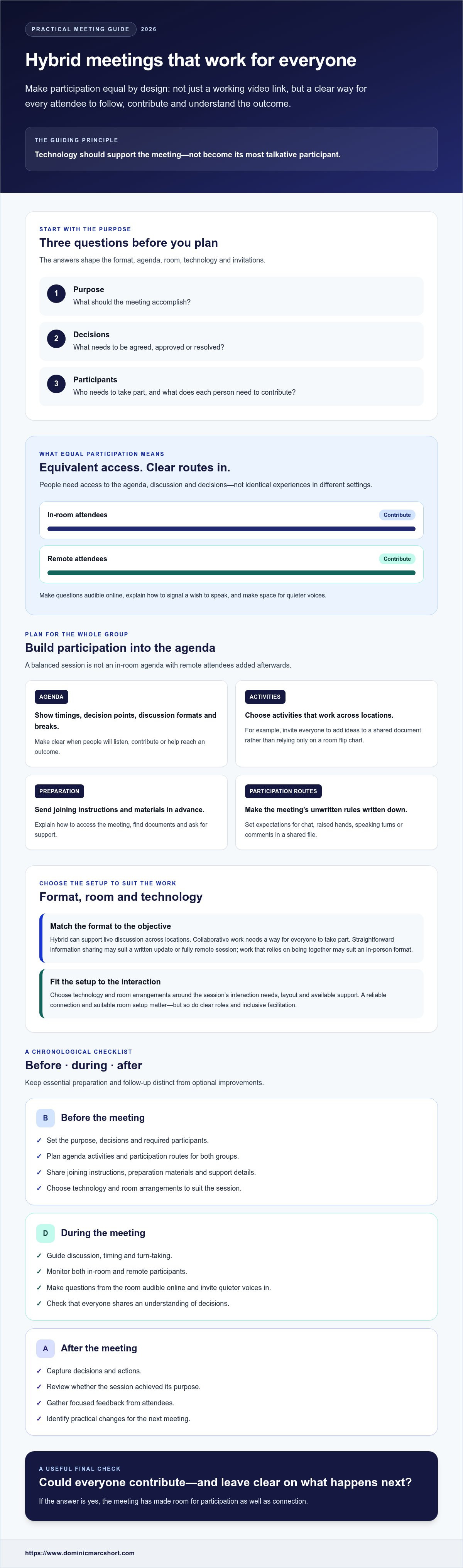
Use this hybrid meeting checklist before, during and after the session
A dependable checklist turns good intentions into a repeatable process. Work through it in order, separating essential checks from optional enhancements. The aim isn’t to add paperwork; it’s to catch avoidable snags before they become the meeting’s main event.
What should organisers check before a hybrid meeting?
Must do: Confirm the purpose, agenda, participant list and responsibilities. Send joining information, explain how attendees can request assistance, and share the documents they’ll need. Be clear about expected preparation and how participants can contribute. Then test the planned room setup and joining process with the materials and people involved. Check that remote attendees can hear speakers and follow what’s being shared. The right checks depend on the meeting, so don’t treat any one technical setup as universal.
Optional improvements: Ask someone who wasn’t involved in planning to try the joining instructions, or run through a key agenda activity in advance. A fresh pair of eyes can spot a confusing step that the organiser has read so often it now seems obvious.
How should facilitators manage the meeting and follow up?
Must do: Welcome remote and in-room attendees, explain how to ask questions or contribute, and briefly restate the meeting objectives. During the discussion, monitor participation across both settings. Make space for questions, acknowledge online contributions and pause at decision points to confirm what’s been agreed.
Afterwards, record decisions, owners and next steps, then share them with participants. A concise follow-up helps everyone leave with the same understanding, rather than a collection of different interpretations and one mysteriously blank page of notes.
Before: Confirm purpose, agenda, attendees, roles, access, materials and the planned room setup.
During: Welcome everyone, explain participation methods, revisit objectives and include contributions from both settings.
After: Share decisions, action owners and next steps with the group.
For deeper participation advice, use a dedicated guide to engaging remote attendees in hybrid events alongside this checklist. These hybrid meeting best practices 2026 keep preparation manageable and connect the meeting plan to clear outcomes. For support with meeting and conference organisation or moderation, explore Dominic Short’s experience.
Improve hybrid meetings through follow-up, learning and expert support
A meeting’s close is the start of its review. Compare what happened with the purpose, decisions and participant involvement you set out to achieve. A session may reach its decision yet still reveal that remote attendees struggled to follow the discussion. Reviewing both the outcome and the experience helps teams improve the next meeting, rather than repeating the same format and hoping for a different result.
How can teams tell whether a hybrid meeting worked?
Review the session while the details are still fresh. Check whether the intended decision was made, whether actions have clear owners, and whether participants from both settings could follow and contribute. Ask focused questions, such as:
Did the meeting achieve its stated purpose?
Could you follow the discussion and access the materials?
Did you have a clear opportunity to contribute?
What one change would make the next session work better?
Invite feedback from both remote and in-room attendees. A brief conversation or simple written response can surface practical issues, such as unclear turn-taking or a decision that needed a clearer recap. Look for recurring themes, but don’t treat informal comments as proof of measurable improvement. Choose one or two feasible changes, assign responsibility and check whether they help next time.
When might external meeting expertise help?
Consider additional expertise when meeting logistics, facilitation or communications create a significant workload for the people organising the session. This may be useful when a meeting involves several moving parts or needs a steady hand to guide discussion. CDABS provides meeting and conference organisation, event logistics, moderation and change-management communications. Dominic Short brings more than 30 years of experience across business travel management, meetings and events, and marketing, and has delivered over 500 events in varied formats and contexts worldwide.
For broader event-planning context, explore this strategic corporate event management guide. It can help connect the practical details of a meeting with wider planning considerations around an event.
The most useful hybrid meeting best practices 2026 include a learning loop: compare outcomes with intentions, listen to both groups and make a practical adjustment. If organising or moderating a complex meeting is stretching internal capacity, consider whether experienced meeting and event support would help. Thoughtful preparation can make the next session feel less like troubleshooting and more like progress.
Make your next hybrid meeting more effective
The strongest hybrid meeting best practices 2026 begin with a clear purpose and continue through inclusive facilitation, a setup suited to the session and thoughtful follow-up. When remote and in-room attendees can contribute, understand decisions and know what happens next, the meeting becomes a useful step towards progress, not just another item in everyone’s diary.
Keep the process practical: check whether the meeting achieved its aims, ask participants what helped or hindered them, and use their feedback to make a specific improvement next time. If organising or moderating a complex session is stretching your team’s capacity, experienced support can help bring structure to the planning and participant experience. Dominic Short has more than 30 years of experience across meetings, events and related fields, and has delivered over 500 events in varied formats and contexts worldwide.
Start with one thoughtful change at your next session. Small adjustments can make it easier for everyone to take part and help your team keep improving.
Frequently Asked Questions
What are the best practices for hybrid meetings in 2026?
The core of hybrid meeting best practices 2026 is to plan for equal access to the discussion, not merely provide a joining link. Set a clear purpose and agenda, choose a format and setup that suit the session, and explain how everyone can contribute. Assign facilitation and technical responsibilities, test the participant journey in advance, then share decisions and actions afterwards. Review what worked and make a practical improvement next time.
How do you make a hybrid meeting inclusive for remote attendees?
Give remote attendees the same access to the agenda, materials, discussion and decisions as people in the room. Explain how to ask questions or signal that they want to speak, and have the facilitator acknowledge contributions from both settings. Check that speakers can be heard and shared content can be followed remotely. Equal participation doesn’t mean identical experiences; it means people have a clear, usable way to take part wherever they’re joining from.
What technology do you need for a hybrid meeting?
Choose technology according to the meeting’s purpose, interaction needs, room layout and available support. At a minimum, check that your chosen arrangement lets remote attendees join, hear speakers, follow essential shared content and contribute. The precise equipment depends on the session; there’s no universal platform or setup that suits every organisation. Test the full journey with the planned materials before the meeting, and agree how you’ll communicate if a technical issue interrupts it.
How can a facilitator manage a hybrid meeting effectively?
A facilitator should guide the agenda, manage turn-taking and keep participants aligned on the purpose and decisions. At the start, explain how people can contribute and ask questions. During discussion, monitor both in-room and remote contributions, pause to include people who haven’t spoken, and recap decisions clearly. If practical, ask another person to monitor remote questions or flag technical issues, so the facilitator can focus on the conversation rather than multitasking like a one-person control room.
How do you keep remote participants engaged in a hybrid meeting?
Give remote attendees purposeful ways to take part throughout the session. Use discussion prompts, invite questions at clear points, and choose collaborative activities that don’t depend on being physically present. Share preparation materials beforehand and explain how participants can use them. The facilitator should bring remote comments into the conversation and check that questions are answered. A meeting link gets people into the session; thoughtful interaction gives them a reason to stay involved.
What should be included in a hybrid meeting checklist?
A useful checklist follows the meeting from preparation to follow-up. Beforehand, confirm the purpose, agenda, attendees, responsibilities, joining instructions, materials and planned room setup. Explain how participants can ask questions or request assistance. During the session, welcome everyone, explain participation methods and monitor contributions. Afterwards, record decisions, action owners and next steps, then share them with attendees. Keep essential checks separate from optional enhancements, so the checklist supports the meeting rather than becoming another meeting.
How can you evaluate whether a hybrid meeting was successful?
Compare the meeting’s outcomes with its stated purpose, decisions and intended level of participation. Check whether actions have owners and whether remote and in-room attendees could follow the discussion and contribute. Ask both groups a few focused questions, such as what helped them participate and what one change would improve the next session. Use the feedback to choose practical adjustments, then review those at the next meeting. Don’t rely on a single attendance figure to tell the whole story.



Comments